









General
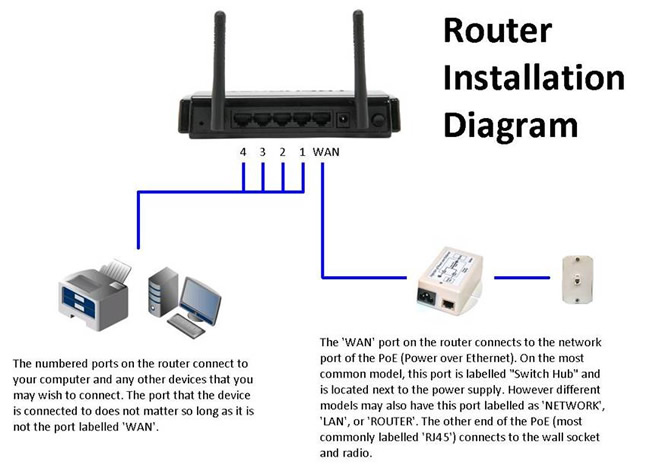
- What is the proper way to setup my router and devices
- What is broadband internet service?
Broadband means data transferred at speeds of at least 256Kbps (Kilobits per second) in both directions.
- What kinds of internet services are available from Cirra Networks?
Cirra Networks uses several technologies in order to provide internet service. They are dial-up, DSL Broadband, and Fixed Wireless. Your location may qualify for more than one service we are capable of delivering. So give us a call to see what services are available to you.
- What are the system requirements for my PC to use Cirra Networks Service?
Your PC must have a 10 BaseT or 100 BaseT Ethernet Network Interface Card (NIC). We do not load any software onto your computer. You do need Windows 95 or newer or Apple's Mac OS 8.5 or greater, and a web browser.
- When I call technical support, do you see what I see on my computer?
No, we do not see what you see on your computer.
- When I surf the internet do you see what sites I've been to?
No, but we can see the amount of IP traffic passing on your connection.
- When should I call technical support?
You should call technical support anytime you can't get online or you have an issue with your email.
- Does your service come with a firewall / anti-virus software?
No, it is up to you to make sure you PC is secure. We can suggest several internet security programs, click here for our recommendations.
- Does your service limit the amount of time I can spend online?
We do not limit the use of your connection, surf the internet for as long as you like.
- Will VOIP service such as Vonage work with your service?
VoIP service needs at least 250Kbps up and 250Kbps down. However, we do not support VoIP networks and we cannot guarantee that they will work for you.
- Why can't I access Facebook, Twitter, YouTube, et al ?
If you are able to connect to other websites, the problem may be that those sites are down. One way to check is to visit: www.downrightnow.com to see the status of those websites.
- Can more than one computer share the connection?
Yes, there is no additional charge for multiple computers. Our service requires a router to separate the customer's network from our network when using multiple computers. The router acts as a firewall to protect the customer's home network from Internet attacks and is an administrative demarcation point that allows customers to build their home network independently.
- Do I have to use a router with your service?
We do not require the use of a router, you can hook it up directly to a single computer. A router allows you to have multiple computers in your home connected to the internet simultaneously. Additional benefits of the router include an extra layer of firewall protection beyond the typical software firewalls built in to the most popular computer operating systems. If you choose to use a router, any broadband router that has an Ethernet port as its WAN or Internet port will work. This includes the wireless routers that are most current and popular.
- What is involved in the installation?
Wireless internet must be professionally installed. We install a small antenna on or near the roof of your home or business. Then a Cat5 cable is run down and into your home to the computer or router. There is not a self-install option.
- What is the typical lead time to have your service installed?
Wireless services can normally be installed within one week, depending on our install schedule.
Service and Plans - Last Update April 2019
-
Where can I login to pay my bill?
Cirra Networks has a new billing system to better serve our customers. Please use the new portal at https://portal.cirranet.net to log in and pay your bill
-
Why does our internet service seem so slow?
The networked home has a multitude of devices and services from many manufacturers all requiring some portion of your limited home internet bandwidth. Increasing reliance on these devices and services demands more data bandwidth to have acceptable performance and speeds otherwise, your experience will be slow. We are compiling resources to help you get the most performance from your internet access while using these devices and services. Please know we cannot provide support for 3rd party products.
-
Why are we not getting the speeds we expected?
We provide service to a location, the Wide Area Network (WAN) (internet connection). Our skilled support personnel will attempt to identify and troubleshoot a connection whether the issue is with our service or the Local Area Network (LAN) . The proliferation of wireless equipment can present challenges to a customers LAN experience, incompatibility, interference, etc. LAN issues can include malfunctioning router, computer, or other device, excessive traffic due to updates or other activity and virus / Trojan infections among a myriad of other issues. Many times we can point a customer in the right direction to solve the problem.
We market and deliver specific levels of service actively managing available resources. We do not advertise “Up To” speeds as they are fictitious; we are up front with what the customer can expect to do using the connection. As an example a customer on a Connect40 plan can stream Standard Definition Videos from Netflix, the Connect50 plan will allow High Definition videos to stream. If your data usage needs grow, we can only support that with a higher service package
If we identify a situation in which the customer's environment, interference, Line-of-Sight (LOS) issues, etc. degrades their connection to the network that we are not able to address, it becomes necessary to provide the connection "as is" or discontinue the service. The option is left to the customer More resources for improving your Home Local Area Network can be found here. -
I'm unable to get someone from support on the phone - what are my options
Our Interactive Voice Recording (IVR) repeatedly offers a way out from the caller queue, “Please leave a message and one of our sales personnel will contact you as soon as possible”. Our sales team is tasked with responding to support calls if the call volume warrants it.
- Do you limit my service with Data Caps or charge more when my data usage exceeds my plan?
Many of our customers who leave for other providers offering portable internet hotspots or promises of faster speeds from satellite return to us. Those providers limit data usage and charge extra fees for data use overages. We do not apply data caps - you can use all of the data that you need at no extra cost.
- What speeds do you quote for residential customers?
Residential customers will always receive the same capabilities presented in our service plans We do not quote speeds, and instead refer to "up to speeds" only for guidance. Performance is based on several factors including - location on the network, customer location and quality of the connection, customer equipment, radio, router, and more importantly, the condition of connected devices. The traffic on a network can vary widely at any given time. We actively manage network resources to provide the best performance possible to all customers on our network.
- Why am I not getting the speeds promised?
Speeds are not a target nor are they a committed rate - they are simply provided as guidance. We sell plans based on capabilities, if you are experiencing an issue, please contact us. If you are interested in a plan with a committed rate and guarantee of performance please consider one of our Professional plans.
- Why should I pay for the R25 rather that a R10 if it will deliver everything I need?
You may very well get the additional capabilities with the R10 plan, but network resources are actively managed. The R25 plan will provide a consistent experience to meet the higher bandwidth needs of some applications. This means that you may be able to view streaming video with the R10 plan, but we will not guarantee it nor will we troubleshoot it. It is not a capability delivered with the R10 plan.
- How are the Small Office Home Office (SOHO) and Residential Plans different?
For both Residential and SOHO customers, service speeds are not a target nor are they a committed rate - they are simply provided as guidance. SOHO customers receive preferential treatment both in available network resources and scheduling in the event of an outage but are subject to same scheduling constraints as the Residential customer. (e.g. available technician and geographic routing).- How are the Small Office Home Office (SOHO) and Professional Plans different?
For SOHO customers, service speeds are not a target nor are they a committed rate - they are simply provided as guidance. Professional plans offer committed rates and immediate attention in the event of a service outage. SOHO customers receive preferential treatment over Residential customers both in available network resources and scheduling in the event of an outage but are subject to same scheduling constraints as the Residential customer. (e.g. available technician and geographic routing).- I have IPS, can I get a service call to get speeds closer to what I was promised?
No. We're sorry, but speeds are provided as a guide and are "up to" not a committed target. We will not schedule a service call based on the performance of a speed test. Our plans are based on the capabilities that each provides, tell us what is giving you trouble?Email
- Why am I having problems with email?
Is the problem sending or receiving? Do you receive an error message? If so please record and provide it to the support desk.
Please check that you are using the correct username and password at: http://mail.mesh.net/
Click on "Check your Webmail"
Username: is your complete email address
Password: Your passwordIf you are able to login here you have the correct information and the issue is with your email client.
If you are unable to log in here then either the information is incorrect or the account has been temporarily disabled due to multiple attempts using the wrong credentials.
This can be the result of using the same account on multiple devices and one of them is not presenting the correct information; this has become a common issue with the proliferation of tablets, smart phones, etc. If you have changed the password on the server you must remember to change it on each of the devices configured to access the account.
This also leads to a second issue, "Mail rejected because the account is full". You may use as many devices as you like to access your email but one of them must be set to download and delete the mail from the server before the mailbox fills up.
Fixed Wireless Broadband
- Are there any health or safety concerns with the wireless signal?
The technology we use operates at very low power levels (4 Watts), similar to a cell phone, and much less than the amount that is emitted by your microwave oven. Also, radio frequency power drops dramatically as you move away from the power source.
- What is Fixed Wireless Broadband?
Fixed Wireless Broadband is a system that uses mostly microwave radio gear to transmit data. Cirra Networks provides Fixed Wireless Broadband service with download speeds of up to 100Mbps and up to 100Mbps upload.
- Will weather affect my Cirra Networks Service?
The effects of weather on microwave radio signals vary based on the frequency used and the distance traveled. Signal degradation is minimal even in heavy fog or rain due to the frequencies we use.
- How does Wireless Broadband from Cirra Networks compare to Satellite internet?
Wireless broadband is sometime confused with satellite because they are both forms of wireless communication. The difference is that Cirra Networks uses a land based microwave radio system that uses short-range links is comparable to wired links like DSL so the performance stays high. satellite links have a lengthy delay due to the roughly 23,000 mile round trip to geosynchronous satellites. This latency causes a drop in performance on many online games, and other two-way interactive applications.
- How large is the antenna used to provide your service? Will I need a permit or HOA approval to place it on my building or home?
In most cases the equipment used is smaller and less obtrusive than a TV Satellite Dish. Section 207 of the Telecommunications Act of 1996 prohibits restrictions on the use of "Over-the-Air Reception Devices" from government (cities or counties) or non-government (landlords or homeowner associations) entities. The ruling pertains to antennas less than 1 meter in diameter and less than 12 feet above roofline. You may still want to contact your homeowners association or landlord for any guidelines they may have on placement of the antenna. For more information, you can get a fact sheet from the FCC at www.fcc.gov/mb/facts/otard.html or contact us with any questions.
Software for Security
For your convenience, we have listed software applications that will give you more peace of mind as you use the internet. From identify theft to computer viruses, being cautious now will pay off later.
Common Security Issues
Cirra Networks sees many diverse security problems however, some are more common than others. Please do review the security issues we see daily software applications.
Internet Protection Service
Cirra Networks Internet Protection Service Plan is designed to keep your internet access in top shape and save you money over the long-term.
Stay in Touch
- How are the Small Office Home Office (SOHO) and Residential Plans different?